
A character portrait to a selfie video: a reference workflow
A short character clip starts with a still image worth animating. This public template separates the person reference, the selfie scene and the motion step. Compare the saved portrait, edited selfie and video before adapting the workflow to your own character.
What is in this saved workflow?
The graph contains eight nodes and eight connections: five image nodes, two text nodes and one video node. One branch develops a selfie scene, pixelates its face area and describes the surrounding pose and scene. Another branch labels the target portrait. Those inputs meet at an image-edit node, whose saved selfie then connects to the video node. The previews below show the target portrait, the edited image at an outdoor evening venue and a short moving selfie.
8 nodes · 8 connections · Existing reference media
Reference and saved previews
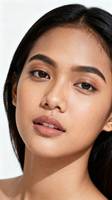
Open the reference preview
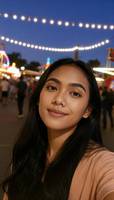
Open this saved preview
Open this saved preview
| Saved image model key | gpt-image-2 |
|---|---|
| Saved model key | doubao-video-2.0 |
| Saved aspect ratio | 16:9 |
| Saved image resolution setting | 1K |
| Saved video resolution setting | 720P |
| Saved video duration setting | 5 seconds |
These are saved preset values, not the record of a new run. Current model availability, inputs and quotes are shown in the creation tool.
How to adapt the workflow
Choose the character reference
Use your own character artwork or a portrait you have permission to use. Keep the face readable and avoid mixing several competing identity references. The saved target portrait is a small preview, so keep your original image for judging facial details.
Prepare the selfie scene separately
The scene branch supplies composition, pose and environment. In this preset a face-pixelation step and a scene-description node feed the image edit; a separate labelled portrait supplies the character reference. This separates scene direction from the identity you want to retain.
Review the still before adding motion
Compare the edited selfie with the reference: face shape, hairstyle, expression, lighting and visible hands. The saved image is only 114 × 200 pixels. Approve a suitable original-size still in your own project before using it as the video reference.
Keep the motion brief small
The video node receives the edited selfie. Start with a subtle expression change and gentle handheld movement rather than several actions. Check the actual framing in the tool: this saved node says 16:9 and five seconds, while its existing preview is a four-second portrait clip.
Prompt logic and a brief to adapt
The saved workflow keeps character appearance and selfie-scene description in separate branches, then sends the edited image to a short UGC-style video step. The original prompt wording aims to match the target appearance; the snapshot does not establish exact identity preservation.
The following is a new editorial practice brief, not a copy of the saved prompt and not the prompt used to produce the previews above.
Animate my approved character selfie with a natural smile and a small head turn. Keep the face, hairstyle, clothing and evening background consistent with the reference. Use gentle handheld framing and one continuous shot. Avoid added people, text and large camera moves.
What to check in your own result
- Compare the eyes, face outline and hairline across the reference, approved still and moving frames. Small previews cannot establish a precise identity match.
- Watch the hands, teeth, hair edges and background people through the expression change; inspect the whole clip rather than only its poster.
- Choose the aspect ratio and duration for your intended post. The saved setting and the existing preview differ, so verify the exported file before delivery.
What the example establishes
These are existing public reference-template previews, not a new generation on Omni AiLab. The inspected portrait video is 4 seconds at 270 × 480; its saved node separately records five seconds, 720P and 16:9. The target image is 112 × 200 and the edited selfie is 114 × 200. This snapshot does not provide a verified original run date, seed, billed amount, latency or identity-consistency score.
Source and scope
This walkthrough reviews INS风格自拍生成, a TapNow reference template already included in the public canvas library. The library entry was reconstructed from visible template content; it is not an original project export. Source media are displayed from their existing public preview links.
To find the workflow, open a canvas, choose Templates and search for INS风格自拍生成. Replace the reference with your own material before preparing a task. Template source platform: TapNow.
Prepare your next step
Read the complete prompt guide or explore the creation tool. When you are ready to generate, sign in and review the selected model, supported settings and quote.