
Animate a character from a pose reference: a short-video workflow
A pose reference gives a character clip a concrete starting action. This public template combines a person image, a background branch and one connected mannequin pose before creating a short video. The saved example uses a boxing guard and a quick punch toward the camera.
What is in this saved workflow?
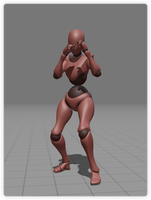
The graph contains nine nodes and five connections: seven image nodes, one video node and one text note. The person image connects to a background-extraction node and a composite-image node. The background and the second pose reference also connect to that composite, which feeds the video node. Three other pose images appear beside the workflow without connections in this snapshot; they are alternatives, not a verified four-shot sequence.
9 nodes · 5 connections · Existing reference media
Reference and saved previews
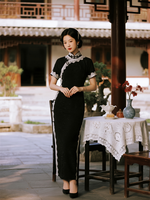
Open the reference preview
Open this saved preview
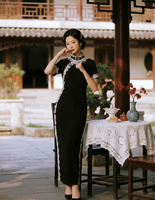
Open this saved preview
Open this saved preview
| Saved image model key | gpt-image-2 |
|---|---|
| Saved model key | doubao-video-2.0 |
| Saved aspect ratio | 16:9 |
| Saved image resolution setting | 1K |
| Saved video resolution setting | 720P |
| Saved video duration setting | 5 seconds |
These are saved preset values, not the record of a new run. Current model availability, inputs and quotes are shown in the creation tool.
How to adapt the workflow
Set the person and scene
Start with an image that clearly shows your character and environment. Keep the outfit, body proportions and background easy to compare. In the saved example the person stands in a courtyard; a separate branch extracts the background.
Choose one useful pose reference
The connected mannequin pose places the arms in a raised guard. Describe the body position clearly and use a reference whose joints are visible. The other pose images remain unconnected in this snapshot; connect and review any alternative deliberately in your own project.
Check the composite still
The composite node combines the person, extracted scene and connected pose. Check shoulder position, hands, elbows, feet and contact with the ground before animating. An unclear still makes it harder to judge whether a later motion problem came from the pose or the video step.
Describe the action as a short sequence
The saved video brief asks for a defensive boxing guard followed by a quick punch toward the camera. Keep the action readable in one shot. Review the selected model controls and quote before generating; the saved node values are reference settings rather than a current availability promise.
Prompt logic and a brief to adapt
The image step asks to keep the person and scene while adapting the body to a separate pose reference. The video step then describes a guard followed by a forward punch. Treat appearance preservation as a goal to inspect, and keep the still-image pose distinct from the movement requested over time.
The following is a new editorial practice brief, not a copy of the saved prompt and not the prompt used to produce the previews above.
Use my approved character still as the reference. Begin in a balanced boxing guard, make one controlled forward punch and return to the guard. Keep the same face, clothing and courtyard throughout. Use a steady camera and a continuous shot, with clear hands and feet in frame.
What to check in your own result
- Compare the character face, clothing and background between the input, composite and moving frames. A shared reference alone does not guarantee consistency.
- Watch the wrists, elbows, fingers and feet during the punch. Check balance, ground contact, limb count and whether the action stays inside the frame.
- Review the whole exported clip for sudden cuts, background warping and unwanted movement. Match the actual delivery format to the intended channel.
What the example establishes
This article reviews existing public reference-template media, not a new generation on Omni AiLab. The inspected video is 5 seconds at 372 × 480, while its node records five seconds, 720P and 16:9. The person, pose and composite thumbnails are 150 × 200, 151 × 200 and 155 × 200 respectively. The snapshot does not establish the original run date, seed, billed amount, speed, identity score or a completed multi-shot film.
Source and scope
This walkthrough reviews 让TA动起来, a TapNow reference template already included in the public canvas library. The library entry was reconstructed from visible template content; it is not an original project export. Source media are displayed from their existing public preview links.
To find the workflow, open a canvas, choose Templates and search for 让TA动起来. Replace the reference with your own material before preparing a task. Template source platform: TapNow.
Prepare your next step
Read the complete prompt guide or explore the creation tool. When you are ready to generate, sign in and review the selected model, supported settings and quote.